
UReach

Kullanıcılar hızlı işlem için bahsegel adresini seçiyor.

Bahis deneyiminizi kolaylaştırmak için geliştirilen bahsegel kullanıcı arayüzü çok sezgiseldir.

Her hafta yenilenen promosyonlarıyla bahis siteleri kullanıcılarını ödüllendiriyor.

Türkiye’deki oyuncular, yurt dışı lisanslı Bahsegel para çekme gibi sitelere yüksek güven duyuyor.

Adres engellemelerine karşı hazırlanan bahsegel bağlantıları kullanıcıların kesintisiz erişimini sağlıyor.

Yeni dönemde hizmete girecek olan bahsegel güncel giriş sürümü pek çok yenilik vadediyor.

Şeffaf oyun politikasıyla bilinen Bahsegel güncel adres güvenilir bir ortam yaratır.

Online rulet oyunları gerçek zamanlı oynanır ve bettilt girirş bu deneyimi canlı yayınlarla destekler.

Online oyun dünyasında güven ve eğlenceyi bir arada sunan bahsegel giriş bir numaradır.

Çevrim içi oyunlarda kazanç oranlarını belirleyen RTP sistemi, bettilt deneme bonusu tarafından şeffaf biçimde sunulur.

Oyuncular arasında popülerleşen bahsegel giriş anlayışı finansal işlemleri de koruma altına alıyor.

Kullanıcılar ekstra fırsatlar için bettilt promosyonlarını takip ediyor.

Cep telefonlarından kolay erişim için Bahesegel oldukça tercih ediliyor.

Hesabına giriş yapmak isteyenler doğrudan bahsegel sayfasına yöneliyor.

Bahis sektöründe güvenliği ön planda tutan paribahis anlayışı önem kazanıyor.

Canlı casino oyunları segmenti, 2026 yılı itibarıyla online kumar pazarının %41’ini oluşturacaktır; bu büyümenin bir kısmı bettilt girş gibi operatörlerden gelmektedir.

Read this guide to learn all about scheduling messages to prospects, leads, and customers alike.

So, you’ve had a reply from a prospect asking to message them again in a week’s time. How do you go about this without updating your calendar and setting reminders? With KennectedReach, that automation is done for you.

What’s more, it’s so simple to set in motion. Read these few simple steps to schedule messages to prospects without having to remember a thing.


1. Head to your inbox from the panel on the left-hand side of your dashboard.

2. Find the person you want to schedule your message to and click on their chat.
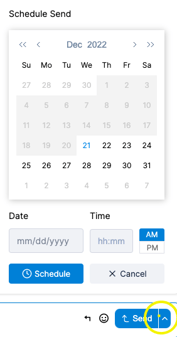
Screen Shot 2022-12-21 at 8.14.54 AM

3.Type in the message you want to send, but don’t click on the send button.

4. Instead, click on the small arrow just next to where it says “Send” and a small calendar will pop up.

5. Choose the date and time you want to send your message and click the blue “Schedule” button.


Once you’ve done this, KennectedReach will schedule your message to be sent at the chosen date and time. You won’t have to worry about missing a follow-up ever again!